

This page explains what happens inside the module when a customer pays an invoice, how WHMCS tracks the state transitions, and where each piece of the handshake lives. Read it once and you’ll know exactly which piece to look at when something doesn’t behave as expected.Documentation Index
Fetch the complete documentation index at: https://docs.paybridgenp.com/llms.txt
Use this file to discover all available pages before exploring further.
The payment flow
Customer clicks Pay Now on an invoice
The customer opens an unpaid invoice in the client area and clicks the Pay Now button rendered by
paybridgenp_link(). WHMCS posts back to the same invoice URL with a hidden flag that tells the gateway to create a checkout session.Module creates a PayBridgeNP checkout session
Inside
paybridgenp_link() with the redirect flag set, the module:- Reads the invoice total and converts it to paisa (
total × 100, rounded) viaAmount::toPaisa() - Builds the return URL and cancel URL - both point at
modules/gateways/callback/paybridgenp.php?invoiceid=<id>, using the Public Callback URL if set or the WHMCS System URL as fallback - Calls
PayBridge::checkout->create()via the PayBridgeNP PHP SDK withamount,currency=NPR,return_url,cancel_url, and metadata (invoice id, client id, client email, WHMCS version,source=whmcs) - Writes a
checkout.createdentry to the Gateway Log with the session id
checkout.api_error to the Gateway Log.On success, it returns HTML that redirects the browser to the hosted checkout URL via <meta http-equiv="refresh"> + <script>window.location.href=…</script> + a manual fallback link.Customer pays on the hosted checkout
The customer lands on
https://checkout.paybridgenp.com/checkout/cs_…, sees your merchant name and the invoice total, picks eSewa or Khalti, and completes the payment through the wallet’s OTP flow.Browser return URL - no state change
After the wallet confirms the payment, PayBridgeNP redirects the customer’s browser back to:The callback file detects this is a browser return (no
X-PayBridge-Signature header) and calls paybridgenp_handle_return(), which:- Validates the invoice id
- Redirects the customer to the WHMCS invoice view with a flash query param (
?paybridge_status=submitted/cancelled/failed) - Does not touch invoice state - the webhook (next step) is the only authoritative confirmation
status=success and a guessed invoice id. Only the HMAC-signed webhook can move the invoice to Paid.Webhook delivery - invoice → Paid
A few seconds after the wallet confirms the payment, PayBridgeNP fires a signed The callback detects the signature header and calls
payment.succeeded webhook to the same callback URL:paybridgenp_handle_webhook(), which:- Reads the raw request body and the
X-PayBridge-Signatureheader - Looks up the webhook signing secret from gateway settings - refuses with HTTP 400 if the secret is not configured (no unsigned fallback)
- Verifies the HMAC-SHA256 signature via the PayBridgeNP PHP SDK’s
constructEvent()- rejects forged events and replays older than 5 minutes - Extracts the invoice id from
event.data.metadata.invoiceid - Calls WHMCS’s
checkCbInvoiceID()to ensure the invoice exists and belongs to this gateway - Calls WHMCS’s
checkCbTransID()to dedupe by PayBridgeNP payment id - if the same webhook is replayed, this exits early before any double-apply - Calls
addInvoicePayment()with the amount converted back to rupees, the payment id as the transaction id, and zero fees - Writes a
webhook.payment_appliedentry to the Gateway Log with the provider, payment id, and amount - Returns HTTP 200
OK
Invoice state transitions
| State | When | Who sets it |
|---|---|---|
Draft | Invoice created by admin, not yet visible to client | WHMCS core |
Unpaid | Published invoice awaiting payment | WHMCS core |
Payment Pending | Optional state some WHMCS flows use while awaiting async confirmation | WHMCS core |
Paid | Webhook confirmed payment.succeeded, addInvoicePayment() settled the balance | Module’s webhook handler |
Refunded | Full refund recorded against the original transaction | WHMCS core (after paybridgenp_refund() returns status=success) |
Cancelled | Admin-cancelled or webhook delivered payment.cancelled before payment cleared | WHMCS core |
What the webhook handler does for each event type
| Event | Action (if unpaid) | Action (if already paid) |
|---|---|---|
payment.succeeded | → addInvoicePayment() applies the payment, invoice becomes Paid | No change - checkCbTransID() silently bails on duplicate |
payment.failed | Logged to Gateway Log as webhook.payment_failed; no invoice state change | Same |
payment.cancelled | Logged to Gateway Log as webhook.payment_failed; no invoice state change | Same |
payment.refunded | Logged as webhook.ignored (refunds are driven from WHMCS admin, not webhooks) | Same |
| Any other type | Logged as webhook.ignored with the event type recorded | Same |
payment.failed / payment.cancelled deliberately don’t move the invoice to a failed state - WHMCS keeps it Unpaid so the customer can retry. The failure is recorded in the Gateway Log for merchant visibility.
The refund path
When an admin clicks Refund on a transaction tied to the PayBridgeNP gateway, WHMCS callspaybridgenp_refund() with the transaction id and the amount to refund.
The module:
- Maps the refund amount to paisa
- Calls
PayBridge::refunds->create()withpaymentId,amount(paisa),reason=other, and anotesfield containing"Refund issued from WHMCS admin (invoice #<id>)" - Logs
refund.success(orrefund.api_erroron failure) to the Gateway Log - Returns
{status: "success", transid: "ref_…", rawdata: <response>}to WHMCS on success
PayBridgeNP’s refund API requires
reason to be one of customer_request | duplicate | fraudulent | other. The module defaults to other and puts the WHMCS-specific context in the notes field, which shows up on the refund detail page in the PayBridgeNP dashboard.Where the module lives in your WHMCS install
After extraction, the module’s files are under:vendor/ directory is bundled inside the ZIP - you do NOT need to run composer install on your server.
The Gateway Log
Every interaction flows through WHMCS’s standardlogTransaction() helper, which surfaces under Utilities → Logs → Gateway Log:
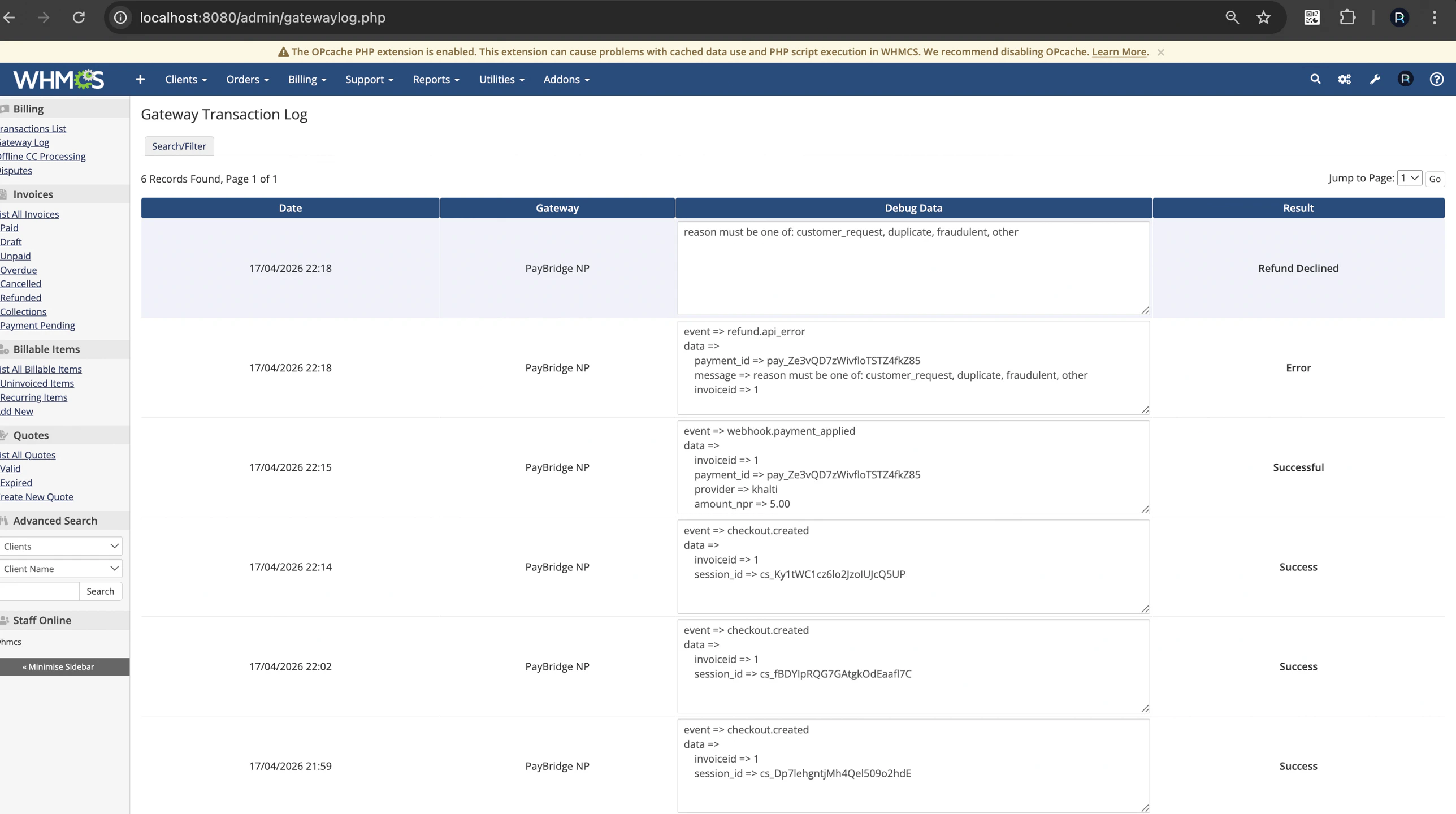
| Event | Meaning |
|---|---|
checkout.created | Customer clicked Pay Now, session created successfully |
checkout.request / checkout.response | Full API body (only logged when Debug Logging is on) |
checkout.api_error | PayBridgeNP rejected the checkout creation - check the message field |
webhook.payment_applied | Invoice successfully marked paid from a verified webhook |
webhook.payment_failed | payment.failed or payment.cancelled event delivered |
webhook.invalid_signature | HMAC verification failed - either the wrong secret or a forgery attempt |
webhook.no_secret_configured | Someone fired a webhook but no signing secret is saved |
webhook.ignored | Event type we don’t act on (e.g. payment.refunded) |
refund.success / refund.api_error | Admin-initiated refund result |
return.hit | Browser return URL was hit (only logged when Debug Logging is on) |
X-PayBridge-Signature header value are automatically redacted before they land in the log - safe to share with support without exposing credentials.
Security model
- Webhook signature verification is mandatory. The module refuses to process webhooks unless the signing secret is configured (HTTP 400 response). There is no unsigned fallback.
- 5-minute replay window. HMAC verification rejects events older than 5 minutes based on the
t=timestamp in the signature header. checkCbInvoiceID+checkCbTransIDare WHMCS built-ins that prevent cross-gateway payment application and duplicate postings.logTransactionscrubbing. The module’sLoggerclass redactsapi_key,secretKey,testSecretKey,webhookSecret,signing_secret,authorization, andX-PayBridge-Signaturebefore passing data tologTransaction().- No raw SQL anywhere. All invoice operations go through WHMCS’s
addInvoicePayment()/ helper functions. hash_equalscomparisons inside the SDK for signature matching - timing-safe.
What’s next
- Troubleshooting - common issues and how to fix them
- Back to installation if you haven’t set up the gateway yet